Revise Major (associated sequences, add new sequence(s)), Minor and Certificate Proposals
Overview
- Each major is associated with a degree type and they are built as individual majors in Campus Solutions therefore each requires a separate proposal submitted in Coursedog. Example, if you want to propose a new major or make revisions to a major that offers both a B.A. degree and a B.S. degree, two separate proposals are required.
- Undergraduate majors and sequences must have a Sample Plan of Study as part of the proposal.
- Review general proposal instructions and proposal deadlines
- If you need assistance anytime before starting or while you are working on a proposal, email Curriculum@ilstu.edu to ask questions or schedule a Zoom training session. Provide 3-4 dates and time-frames that will work for you.
Coursedog Training Video: Revise Major (and/or associated sequences), Minor or Certificate
Minor Edits to Major (and/or associated sequences), Minor or Certificate
This proposal type may be used for revising electives, editing the description, revising sample plans of study or changing modality. Do not use this proposal type to request changes to total hours or required courses.
- Log in to Coursedog's Curriculum Management System using your ISU email and password.
- From the home page click on +NEW PROPOSAL on the right side navigation under the Actions heading.
You will be prompted with questions to route you to the correct proposal form.
-
Select the Minor/Simple Edits proposal type. This form may be used for adding electives, editing the description of the major, sequences, minor or certificate, or changing the program modality.
Do not use this proposal type to request changes to total hours or required courses.
-
Enter the Effective Starting Term -- Summer and the year for the upcoming Catalog Year. ISU Catalog Years always start on the first day of Summer Session.
-
Do not enter an Effective End Term.
- If you leave a proposal before submitting it, click Save on the right side navigation and when you log back in you will find it in Drafts on the left navigation.
- Complete the fields on the proposal. Some fields will have notes next to them, this is important information, please read it carefully before completing the field. Some fields will be only visible and not editable.
If you are not sure how to complete a field, please stop and email Curriculum@ilstu.educompleting a form incorrectly will ultimately take more time.
- Refer to Requirements and the Sample Plans of Study for information about making revisions to these proposal sections.
- The Coursedog Only Catalog Fields section includes a Catalog Display Name and Brief Description for the Major, Minor or Certificate, depending on what type you are proposing changes to. Refer to the notes next to the fields for guidance on the required formatting.
- When you are finished completing all the proposal fields, click Submit.
Revision to Major (and/or associated sequences or to ADD a new sequence to an existing major), Minor, or Certificate
Use this proposal type to make revisions that impact required courses and/or total hours required to existing majors (and/or associated sequences or to ADD a new sequence), Minor or Certificate.
If you are only making changes to electives and/or the sample plan(s) of study, use the Minor/Simple Edits form instead of this one. The approval workflow for each form is different.
- Log in to Coursedog's Curriculum Management System using your ISU email and password.
- From the home page click on +NEW PROPOSAL on the right side navigation under the Actions heading.
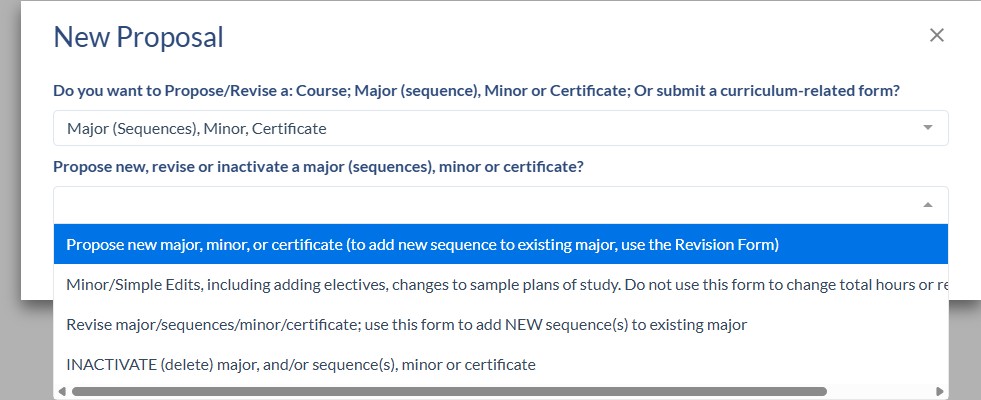
- You will be prompted with questions to route you to the correct proposal form.
- Click on Major (Sequences), Minor, Certificate
- Click on Revise major/sequence/minor/certificate
-
After selecting Revise major/sequence/minor/certificate, Select the Effective Start Term. All program proposals must start in the summer, since ISU's catalog year begins on the first day of summer session. Once a catalog is live no edits can be made. Select the upcoming Summer and Year for the start of the next Catalog. Refer to the proposal deadlines for the upcoming catalog.
-
Do not enter an Effective End Term.
-
In the search box start typing the name of the major, minor or certificate. All sequences are associated with a major so if you want to propose edits to a sequence, you search for and select the major and then you will see all of the sequences associated with that major on the proposal form.
- If you leave a proposal before submitting it, click Save on the right side navigation, when you log back in you will find it in Drafts on the left navigation.
- Complete the fields on the proposal. Some fields will have notes next to them, this is important information, please read it carefully before completing the field. Some fields will be only visible and not editable. If you are not sure how to complete a field, please stop and email Curriculum@ilstu.educompleting a form incorrectly will ultimately take more time.
- Some questions, such as "Does this major (or associated sequences), minor or certificate lead to teacher certification/licensure?" impact the proposal workflow. If you answer incorrectly, the proposal may have to be routed back to you and the workflow reset which will take additional time.
- Refer to Requirements and the Sample Plans of Study for information about making revisions to these proposal sections.
- The Coursedog Only Catalog Fields section includes a Catalog Display Name and Brief Description for the Major, Minor or Certificate, depending on what type you are proposing changes to. Refer to the notes next to the fields for guidance on the required formatting.
- When you are finished completing all the proposal fields, click Submit.