After Submitting Proposals in Coursedog
Coursedog Training Video: Proposal Dashboard, Reviewing Proposals and Making Decisions on Proposals
- After a proposal is submitted, it will move through the workflow steps associated with the proposal type.
- The reviewers associated with each workflow step will review the proposal and the reviewers who have permission to make decisions on proposals (committee chairs, department chairs, deans, AVP for undergraduate or graduate education) will make a decision. At each workflow step, the designated person for that workflow step will make a Decision about the proposal.
Decision options:-
Approve - Moves the proposal on to the next step in the workflow
-
Reject - Kills the proposal, this cannot be undone by anyone, including the Curriculum staff or Coursedog. The author will receive an email notifying them that the proposal was Rejected.
-
Route Back
- The reviewer will indicate if they want the proposal to go back to the Author or to a previous step in the workflow, and if the proposal should go back through the entire workflow or to return the proposal to the current step. The reviewer must also include comments about their decision.
- If a proposal is routed back to the Author, the Author will receive an email from Coursedog. The email will include a link to the proposal. The Author should review comments by the reviewer. Scroll down to the bottom to see the latest comments.
-
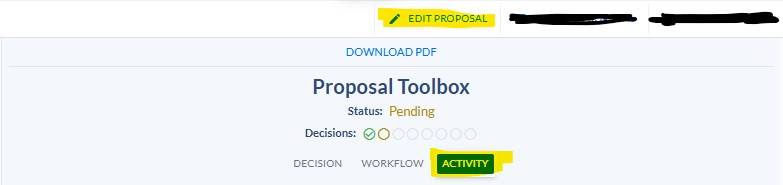
To make edits, click Edit, make edits and click save. A prompt will appear asking if the proposal workflow should reset and go back through the entire workflow or return to the current step (back to the reviewer who routed the proposal back to the author).
The Author will typically select "return to current step" but they should review any comments made by the reviewer, they may indicate that the proposal should route back through the entire workflow if significant edits are needed. You can see comments made in the Proposal Toolbox area under the Activity tab, and scroll down to the bottom to see the latest.
- If the Author decides they do not want to make the edits, and they don't want to resubmit the proposal back to the workflow, they can click Reject. Clicking Reject kills the proposal and this cannot be undone by anyone.
- The reviewer will indicate if they want the proposal to go back to the Author or to a previous step in the workflow, and if the proposal should go back through the entire workflow or to return the proposal to the current step. The reviewer must also include comments about their decision.
-
Approve - Moves the proposal on to the next step in the workflow
Proposal dashboard overview
Reviewing proposals, who can/needs to 'vote' (approve, route back, reject) on proposals in Coursedog