Creating and Revising Sample Plans of Study
New Features and Layout for the Sample Plans of Study Section of Proposals are coming in November. The following video and instructions will be updated as soon as possible. If you have questions as you are working on a proposal please email us at Curriculum@ilstu.edu
Coursedog Training Video: Creating and Revising Sample Plans of Study
Sample Plans of Study (referred to as Degree Maps by Coursedog), are a required part of proposals for undergraduate majors and sequences only. Do not add Sample Plans of Study for minors, certificates or graduate programs.
- On the proposal, scroll down to the Sample Plans of Study (Degree Maps) - Undergraduate Majors and Sequences Only section.
- Click on + NEW MAP
-
Degree Map Name field - use the following format: "Major in __________" or "_______________ Sequence"
Examples:
"Major in Social Work"
"Crop and Soil Sequence"
-
Degree Map Narrative field - copy and paste the copy to the right of this field. This copy is general information that pertains to all majors and sequences.
The last line of the copy should only be included for Accelerated Sequences.
"To graduate in an accelerated sequence a student must take at least one course for graduate credit."
- Under Miscellaneous, turn on "Displayed in Catalog" - it should be blue. Do not turn on the "Set as Default".
- Click on + NEW SEMESTER
- Click on Undefined Year, Undefined Term
- Select the Year and the Term
- Click on + NEW REQUIREMENT
- Click on the requirement and then click EDIT
-
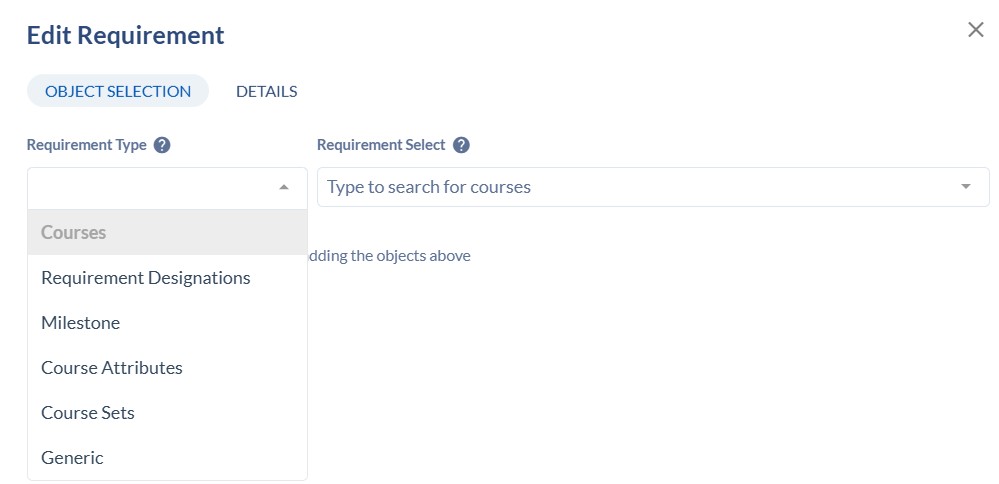
Only use the following Requirement Types:
Courses, Generic and Course Sets.
- The Course Sets type is only be used when adding, AMALI, IDEAS, BS-SMT, or the Bachelor of Arts World Language requirements.
- The Generic type should be used to indicate "General Education course" or "Major elective" or "University wide elective".
- The Course Sets type is only be used when adding, AMALI, IDEAS, BS-SMT, or the Bachelor of Arts World Language requirements.
- To add a specific course, select Courses for the Requirement Type, then in the Requirement Select field, type the course subject code and number with no spaces in between. Example, ACC131.
- Click the course to add it. New course proposals must be fully approved before the course may be added to a sample plan of study.
- If the course is a variable hour course, click on the Details tab and then Actual Credits
to set the specific min. and max hours that you want to add to that semester in the plan of study.
- Click the course to add it. New course proposals must be fully approved before the course may be added to a sample plan of study.
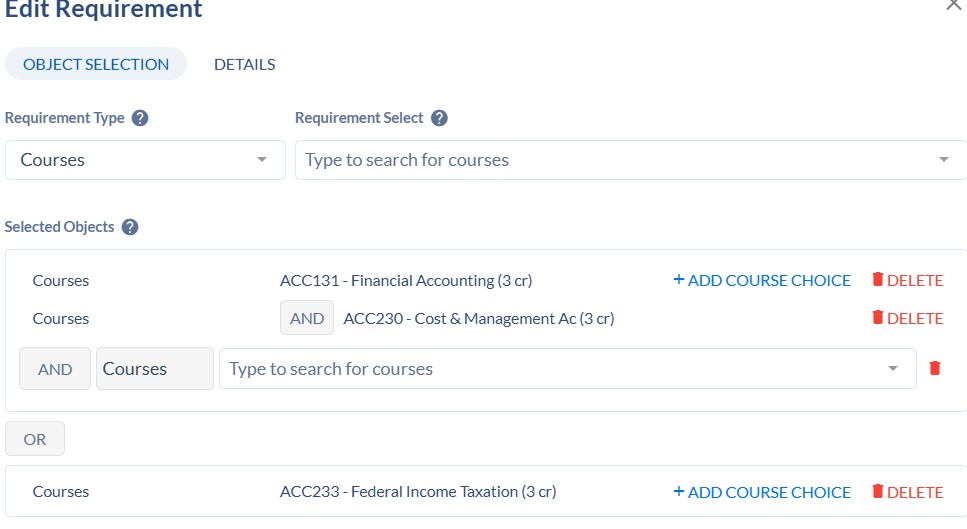
- To add another course, click the +ADD COURSE CHOICE
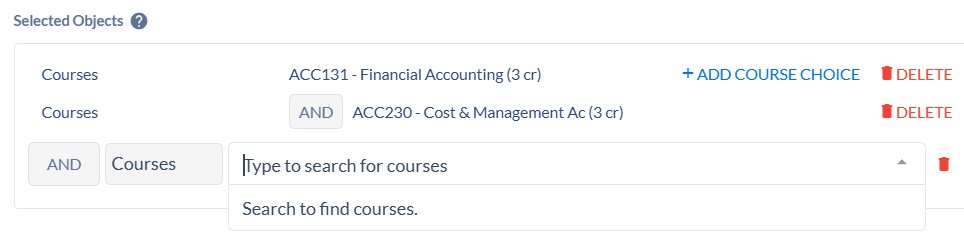
- To add a course
option, with an "or", type the course subject code and the number, no spaces in between in the Requirement Select field.
- To add a Course Set requirement, Select Course Set for the Requirement Type, and start typing the name of the requirement in the Requirement Select field.
-
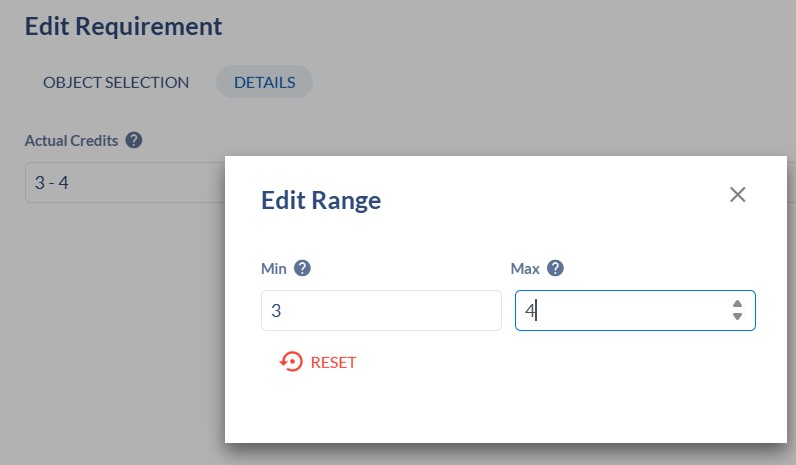
- After you add it, click on the DETAILS tab and click on Actual Credits.
- Set the min. and max credit hours. This will depend on the Requirement.
Example, if you are adding the BS-SMT (Bachelor of Science - Science, Mathematics, Technology requirement, you can set the max to 5 since there are 5 credit hour courses that are approved to fulfill this requirement or you can set it to 3 or 4 if that is what will work for the sample plan of study.
If you forget to set the max hours you may see a very high total of actual credits for that semester because it will be counting all of the courses that are approved to satisfy the Requirement (i.e. all approved AMALI courses).
-
-
Generic Requirement Type: use this for Major electives and University wide electives and all Gen Ed categories.
-
-
- In the Requirement Select field, type the name of the requirement using the following formats:
General Education course
Major elective or Senior college level major elective
University wide elective or Senior college level major elective - Click Add
- Click on the Details tab and enter the min. and max. hours
- Click Save
- In the Requirement Select field, type the name of the requirement using the following formats:
-
-
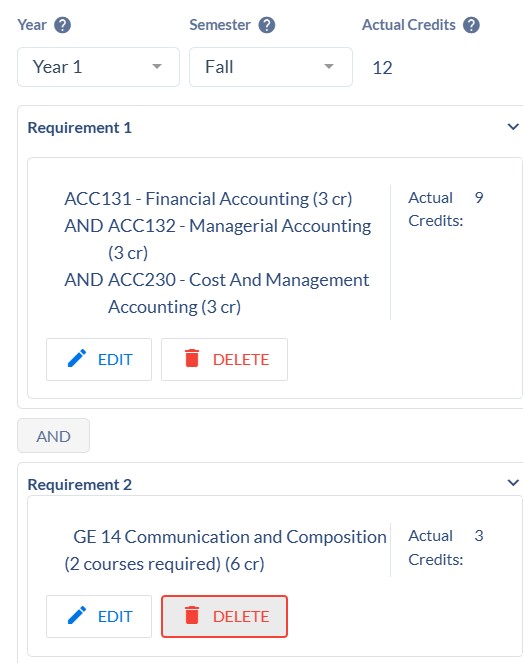
- Continue to Add Requirements until you get the complete set of requirements for that semester. You will see the total Actual Credits for the semester at the top
-
Repeat these steps for every year and semester for the 4 year sample plan.
- At the very top of the Sample Plan you will see the Total Degree Map Credits under the Degree Map Name.
- This is automatically calculated based on the requirements built.
- This must be a minimum of 120 credit hours since that is required for every undergraduate degree.
- Most Sample Plans will have a variable number of credits since some courses are variable hours.