Revise Course Proposals
If you need assistance anytime before starting or while you are working on a proposal, email Curriculum@ilstu.edu to ask questions or request a Zoom training session. Please provide 3-4 dates and time-frames that will work for you.
General information about Course Revision Proposals - Minor Edits and Significant Revisions
- Data fields that are integrated with our Campus Solutions system will be pre-populated with the data as of the effective date for the course.
- Depending on the proposal form type you selected, Minor Edits or Significant Revisions, some fields will be visible only and some will be editable.
- An Anchor Syllabus is required for significant revision proposals.
- Do NOT submit a proposal to revise a cross listed course without consulting with the Curriculum staff first. Coursedog handles cross listed courses differently and there are administrative tasks that must be done as part of the process.
- If a revise course proposal is associated with a program proposal, submit the course proposals first.
- The Starting Effective Date/Term for the course proposal(s) must be Summer Term or before because program proposals are always effective with the start of a new Catalog Year. The ISU Catalog year always starts on the first day of Summer Term.
- If you are proposing revisions to a course that includes changing credit hours, hold on adding the course to the Sample Plan of Study section of the program proposal until the course revision proposal is fully approved. The Sample Plans of Study section auto-calculates the credit hours for each semester and the overall Sample Plan so you want the course revision proposal to be fully approved so the new credit hours are reflected in the Sample Plan of Study.
- Departments/Schools are responsible for communicating significant course revisions (prerequisites, credit hours, etc.) for courses that are taken by students for general education, University requirements, or as service courses to students in other majors.
- Communication should occur prior to the revisions taking effect. For example, if the course is required by other programs, those programs will likely need to be revised if the course credit hours are changing so advanced communication is needed.
- Consider when the course revisions should be effective (what semester/term) to reduce negative impacts to students.
- If the course is required in programs, and the revisions include changes to prerequisites, credit hours, titles, the revisions should be effective with the start of a new catalog year since program revisions must always be effective with the start of a new catalog year. ISU catalog years always begin in May with the first day of Summer Term.
Coursedog Training Video: Revise Course
- If there is a chance that a course has had a Course Revision proposal approved recently, before starting the proposal you should identify the latest effective date for the course so you select the correct Effective Start Term. There may already be approved revisions for the course for a future term so you want to use that same term or after that term for your proposal so your proposed revisions will not overwrite the previously approved revisions.
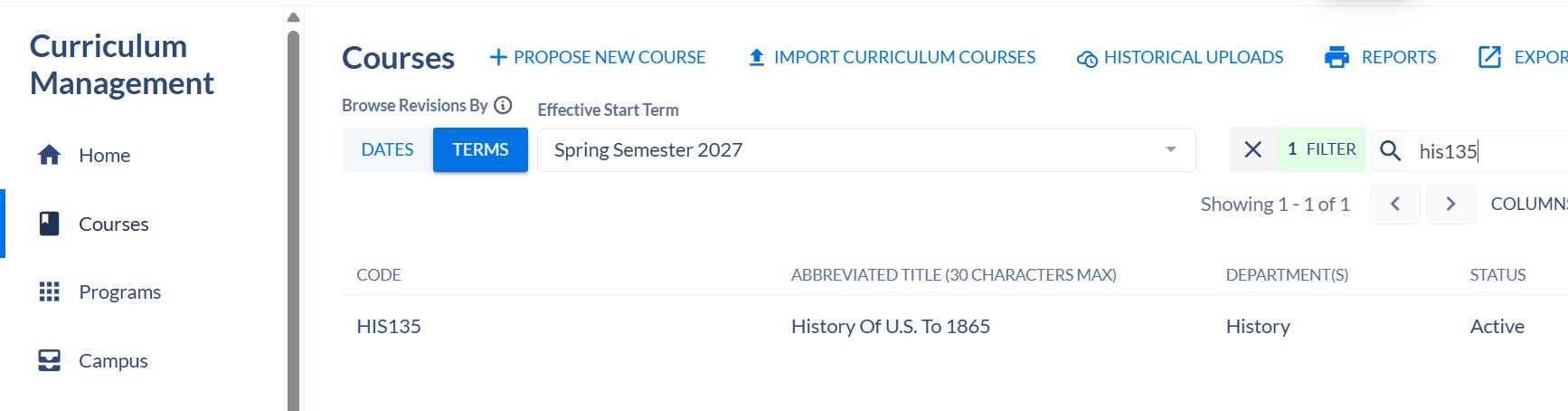
- To check the latest effective date for a course, from the main Curriculum Management home, click on Courses from the left-side navigation.
-
In the search box on the far right, enter the subject and number with no spaces. then click on the course when it appears.
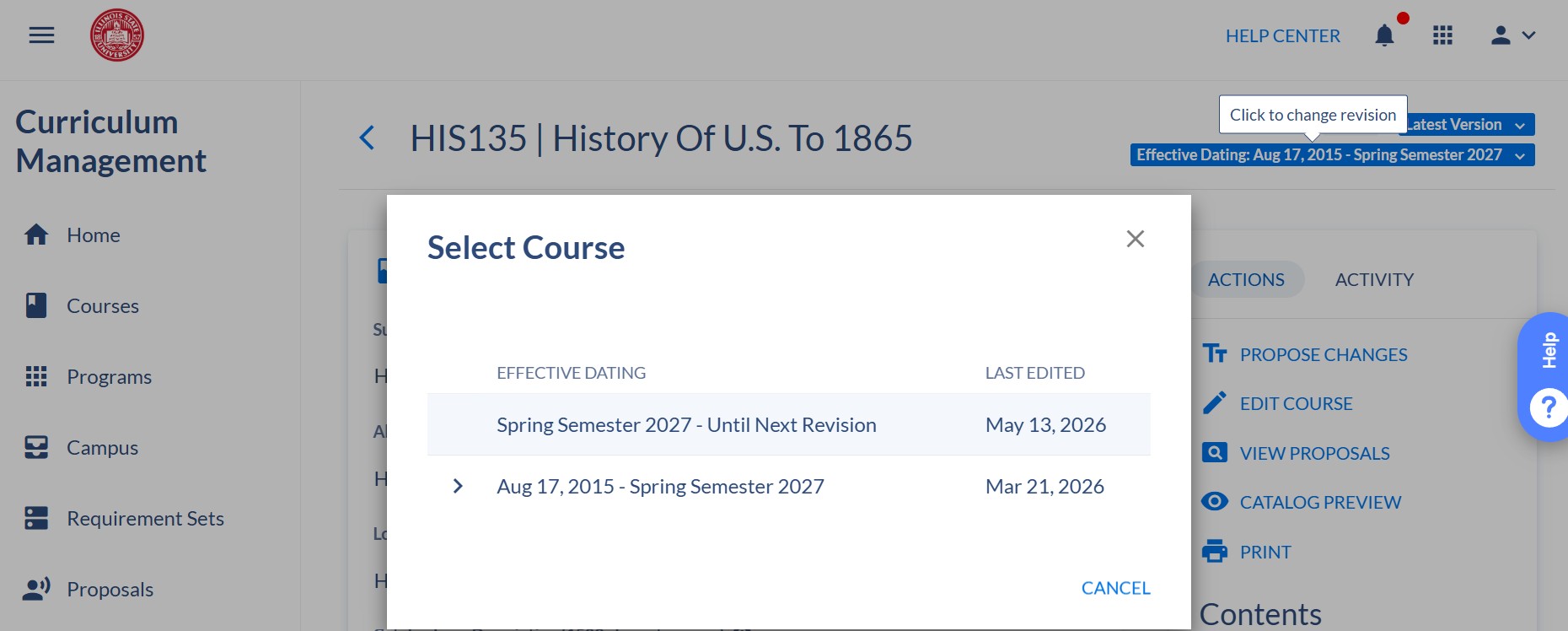
- Click on the blue Effective Dates in the upper right corner.
-
In this example, you will see the current effective date (the one with the arrow to the left) and a future effective date (Spring Semester 2027). This means that the course has changes approved for the Spring 2027 semester.
-
If the course you want to revise has a FUTURE effective date, this means that when you propose revisions for the course you MUST select that semester or later as the Effective Start Term so that your revisions will not overwrite the revisions that have already been approved for the course.
-
In the above example, you can select Spring 2027, Summer 2027, Fall 2027 or later, when you start your proposal as long as the deadline has not passed for course revisions for that semester.
- Once deadlines pass for a specific semester/term, our office will remove that semester/term as an option to select.
-
Do not click on the PROPOSE CHANGES under the Actions on the left-hand side. You must go back to the Home to start a new proposal.
-
To start your proposal, go to the Curriculum Management Home.
Coursedog Curriculum Management System
-
On right-side, under the Actions heading, click on + New Proposal. Always start a proposal from the Coursedog Home.
-
You will be prompted with questions to direct you to the appropriate form:
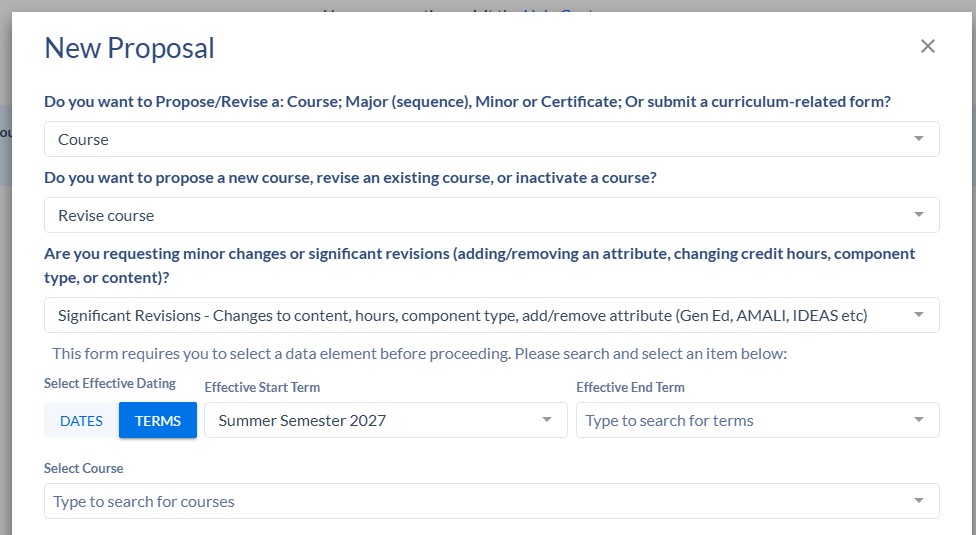
Do you want to Propose/Revise a: Course; Major (sequence), Minor or Certificate; Or submit a curriculum-related form?
From the drop down - select Course
-
You will be prompted with another question:
Are you requesting minor changes or significant revisions (adding a new attribute, changing credit hours, or changing content)?
Refer to the following to determine which proposal type you need to use based on the types of revisions you wish to propose.-
Minor Edit to Course - Use this proposal type to request minor edits to course titles, descriptions, or to request changes to prerequisites (including courses that are offered by another department as long as you upload an email of support from that department chair). This proposal only routes to the Department Chair and the AVP for Undergraduate or Graduate Education.
You cannot use this proposal type to request changes to content, credit hours, components (i.e. lecture, lab) or to add or remove a course attribute (for Gen Ed, IDEAS, AMALI, etc..). -
Revise Course - Significant revisions - Use to request changes to content, credit hours, component type(s), add or remove course attribute(s) (Gen Ed, AMALI, IDEAS, etc.). This proposal routes to the Department Curriculum Committee, Department Chair, College Curriculum Committee, Dean, and the AVP for Undergraduate or Graduate Education.
If you are unsure which to use, email Curriculum@ilstu.edu BEFORE you start your proposal. Ensuring you have the correct proposal form will save everyone time and frustration.
-
Minor Edit to Course - Use this proposal type to request minor edits to course titles, descriptions, or to request changes to prerequisites (including courses that are offered by another department as long as you upload an email of support from that department chair). This proposal only routes to the Department Chair and the AVP for Undergraduate or Graduate Education.
- Select the Effective Start Term, if you want the course revisions to be reflected in the upcoming Catalog, the Effective Start Term must be Summer Term or before.
- Never enter an Effective End Term. We do not use them and if you enter one it may cause issues with the proposal.
- Enter the course subject code and course number in the search field with no spaces in between.
- Complete the fields on the proposal form. Read the notes next to the fields. Some fields may be visible but not editable and will differ between form types.
- Do not add/remove any IAI attributes - the approval and removal of IAI attributes is done through the Illinois Articulation Initiative (IAI) program, not the ISU curriculum process.
- If you want the course reviewed for General Education or a University requirement (AMALI, IDEAS, etc.) add the appropriate attribute. You cannot add or remove course attributes using the Minor Edit proposal form.
If a course is already approved for the GE14 program, do not remove that attribute if you want the course reviewed for the new general education program. - Proposals automatically save, and you can go back to it later by clicking on "Drafts" on the left navigation.
- Click Submit Proposal on the right side navigation, under the Actions heading, when you are done making necessary revisions to the fields.