New Course Proposals
If you need assistance anytime before starting or while you are working on a proposal, email Curriculum@ilstu.edu to ask questions or request a Zoom training session. Please provide 3-4 dates and time-frames that will work for you.
- Do not submit a new cross listed course proposal. Coursedog does not successfully process cross listed courses without our office completing additional processes. Email curriculum@ilstu.edufor assistance.
- Review proposal deadlines and general proposal form instructions
- Review information about course component types.
Coursedog Training Video: Propose New Course or New Temporary Course
- Request an available course number from Curriculum@ilstu.edu before you start the proposal.
- Temporary course numbers must be decimalized 189Axx, 289Axx, 389Axx, 489Axx, or 589Axx. Coursedog requires an uppercase "A".
- Link to the Coursedog Curriculum Management System - Log in with your ISU Central Login email and password.
- In the Curriculum Management System, from the home page, on right-side, under the Actions heading, click on + New Proposal.

-
You will be prompted with this question:
Do you want to Propose/Revise a: Course; Major (sequence), Minor or Certificate; Or submit a curriculum-related form?
- From the drop down - select Course
-
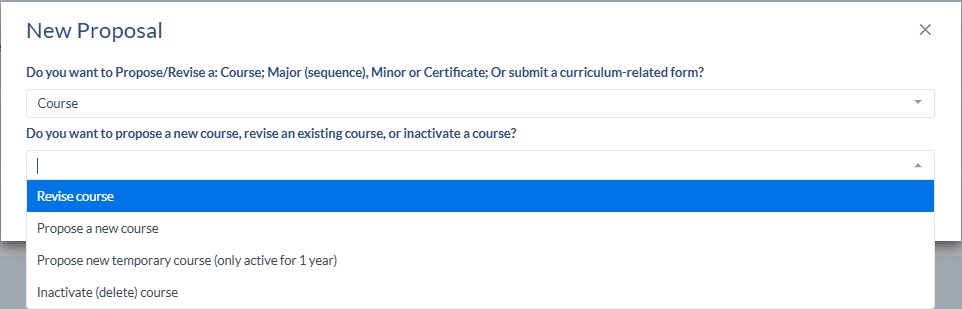
You will be prompted with another question
Do you want to propose a new course, revise an existing course, or inactivate a course?
- Select "Propose a new course" or "Propose new temporary course"
-
If the course will be associated with program proposal(s), new or revisions, submit your course proposals first. The Starting Effective Date/Term for the course proposal(s) must be before or the same as the Starting Effective Date/Term associated with the program proposal. It is best practice to wait to submit program proposals until all of the associated course proposals have been approved.
- New courses must be fully approved to be added to the Sample Plans of Study section of a program proposal. Sample Plans of Study are required for all undergraduate major and sequence proposals.
- New courses that have proposals "in-flight"/working their way through the approval workflow, can be added to a program proposal's Requirements section. A note will appear next to the course indicating "pending in workflow".
- You will be taken to the New Course or New Temporary Course Proposal Form. These are two separate forms because there are different workflows associated with them.
- An Anchor Syllabus is required.
- If you get an error message when you enter the course number, that says the number is not available, and it is the number you received approval from Curriculum staff to use, send an email and we will investigate the issue.
- Complete the fields on the form.
The notes next to some fields provide important guidance. If you have questions about how to complete a field, stop and email Curriculum@ilstu.edu Some fields are only visible to you, not editable.
-
Once you start a proposal it will autosave. Saved drafts of proposals may be accessed in the Drafts folder on the left-side navigation.
-
Do not add or remove IAI (Illinois Articulation Initiative) attributes. The process for IAI approval is outside of the ISU curriculum approval process. Email itransfer@itransfer.org for assistance with this process.
-
Temporary courses can only be active for one year. They may not be used to satisfy any major, sequence, minor, certificate, general education program requirement or any University-level requirement (AMALI, IDEAS, BS-SMT).
-
Proposals automatically save, and you can go back to it later by clicking on "Drafts" on the left navigation.
-
Do NOT submit a proposal for a new cross listed course without consulting with the Curriculum staff first. We will have to assist with this process.
- Click Submit Proposal on the right side navigation, under the Actions heading, when you are done completing the fields.